

Smart Digital Board in Srinagar
A smart digital board (also known as a smart board, interactive flat panel or IFP) is a large touchscreen, usually 65 to 98 inches, that does the job of a blackboard, a whiteboard and a projector in one device. You write on it with a finger or a pen, play videos and run apps on it, and connect a laptop or phone to it with a cable or wirelessly. For schools, coaching centers, colleges, offices and training rooms in Srinagar, it has become one of the most practical technology upgrades available. But buying a smart digital board in Srinagar or anywhere can be confusing: the same size can come at very different prices, the specifications are full of jargon, and Kashmir’s cold winters and power conditions are rarely mentioned by sellers.
This guide explains what a smart digital board is, which size and specifications suit your room, what decides the price, what to check before you pay, and what is specific to buying and using one in Srinagar and the wider Kashmir region.
What is a smart digital board?
A smart digital board is a commercial-grade touchscreen display with a computer built in. Most models have four parts:
- A 4K display, usually 65, 75, 86 or 98 inches, protected by hardened glass.
- A touch layer that reads fingers and pens at the same time, commonly with 20 or more touch points.
- A built-in Android system, so the board works on its own without a computer. Many models also accept a Windows module (called OPS) for running full PC software.
- Ports and wireless connections for laptops, phones, cameras and USB drives.
Smart digital board, smart board, digital board, interactive panel and IFP are different names for broadly the same product, so any of them will lead you to the same range.
Smart digital board vs projector, smart TV and whiteboard
| Parameter | Smart digital board | Projector and screen | Consumer smart TV | Whiteboard |
|---|---|---|---|---|
| Touch and writing | Built-in multi-touch, finger and pen | Needs an extra interactive kit | Usually no touch | Marker only |
| Visibility in a bright room | Clear in daylight | Often needs the room dimmed | Clear | Clear |
| Shadow on the screen | None | Presenter can cast a shadow | None | None |
| Running costs | Low | Lamp or laser upkeep, filter cleaning | Low | Markers and erasers |
| Built for all-day use | Yes, commercial grade | Yes, with upkeep | Designed for home viewing | Yes |
| Saving and sharing a lesson | Yes, as files | Depends on the setup | Limited | Photograph only |
A consumer TV can look cheaper, but it lacks proper touch, and many are not rated or warranted for all-day commercial use, so read the warranty terms before treating one as a substitute. A projector still makes sense when the budget is tight and the room can be darkened, but a smart digital board gives a better daily experience with less upkeep.
Who uses smart digital boards in Srinagar, and what each should look for
Schools and coaching centres
When choosing a smart board for classroom teaching, prioritise these points:
- Size: 75 inches for a standard class, 65 inches for small batches.
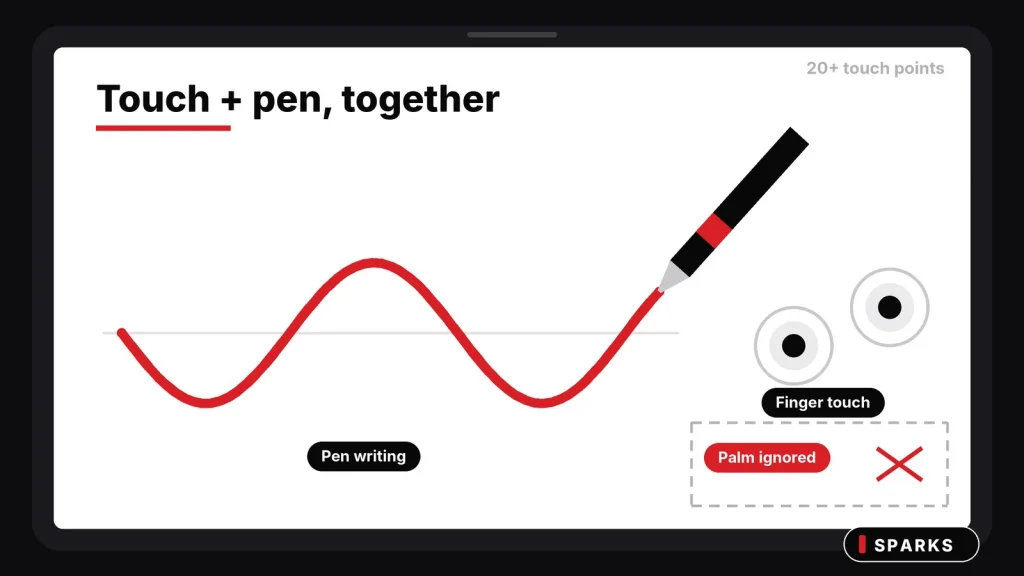
- Writing quality: smooth pen and finger writing with palm rejection, so a child resting a hand on the screen does not disturb the lesson.
- Eye comfort: an eye-care or low-blue-light mode, because the board is watched for hours every day.
- Mounting height: low enough for the youngest students who will come up to write.
- Teacher training: a board that nobody feels confident using ends up as an expensive TV.
Colleges, universities and training institutes
Lecture halls and seminar rooms usually need an 86-inch board or larger, or two boards. If lessons are recorded or shared with remote students, pair the board with a PTZ camera and a wireless microphone so that online learners can see and hear the lecturer properly. Wireless casting lets lecturers present from their own laptop or phone, and a Windows module is worth having if your department runs specialised software.
Offices, boardrooms and government departments
In meeting rooms the board replaces the projector, the whiteboard and the cable tangle. Look for a Windows module if your team uses Teams, Zoom or Google Meet with its own accounts, an easy wireless way for visitors to share their screen, and a camera and microphone that suit the room. In a shared room, make sure settings and accounts can be locked so that one person’s changes do not affect the next meeting. If you are buying against a departmental or tender specification, share it with your supplier before you finalise, so that every line is matched.
The same points apply to hotels, conference venues, hospitals and training rooms.
Smart board for classroom teaching: what educational institutions should plan
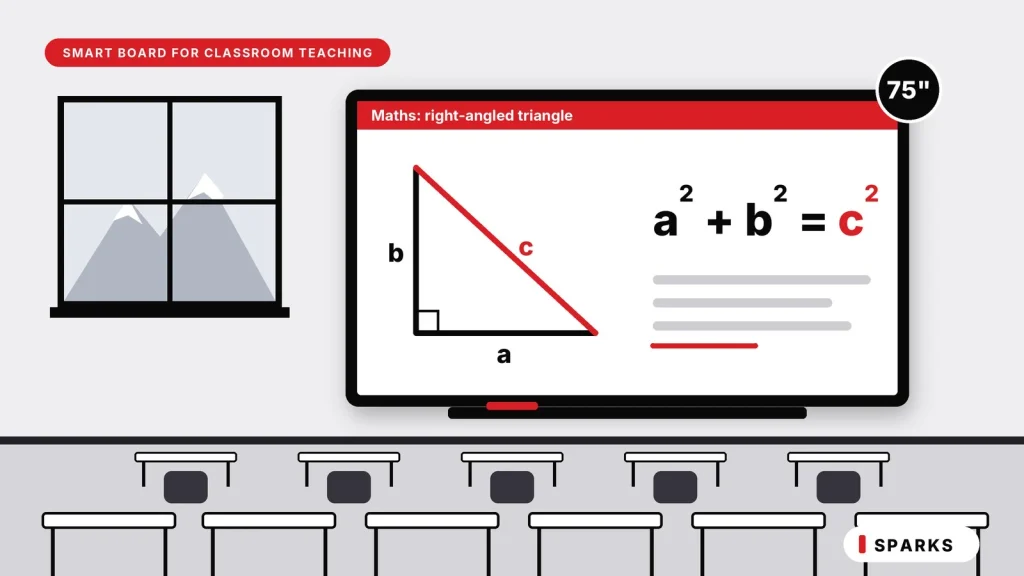
A smart board for classroom teaching is only worth the investment if teachers use it every day. For schools, colleges and coaching institutes in Srinagar, that depends less on the board’s headline specifications than on how well it fits the way lessons are taught, how it is installed, and whether staff are trained to use it.
How teachers use a smart board in the classroom
- Writing over any content: annotate a PDF, a textbook page, a map or a video with the same pen, then save the lesson as a file for students who missed the class.
- Showing, not just telling: diagrams, videos and simulations make science, geography and maths topics easier to follow.
- Student participation: on most boards two or more students can write at the same time, so problem solving can happen at the board and not only at the desk.
- Quizzes and polls: use teaching apps for quick checks of understanding during the lesson.
- Recorded and hybrid lessons: with a PTZ camera and a wireless microphone, a lesson can be recorded or shared with students who are not in the room.
What matters most in a classroom
- Durable glass and a stable frame, because a classroom board is touched dozens of times a day. Keep chalk dust away from it if a blackboard is still used in the same room.
- Low writing lag, so that handwriting looks natural and teachers do not give up on the pen.
- Anti-glare glass and good brightness, especially in classrooms with large windows.
- A sensible mounting height, lower for primary classes, or a mobile stand if one board serves several rooms.
- Simple teacher software with a one-tap whiteboard, so that a lesson can start in seconds.
- Content and apps that match your syllabus, whether your school follows JKBOSE, CBSE or another board. Check that the apps you plan to use run on the board you choose.
- Proper earthing and a stable power supply, as covered in the Kashmir section below.
Rolling it out across a school or institute
- Start with a pilot. Install in one or two classrooms with teachers who are keen to use it.
- Train before you install. A short, hands-on session for teachers matters more than any feature on the spec sheet.
- Prepare content early. Teachers should have lessons ready on the board in the first week.
- Review, then expand. After a few weeks of real use, fix what did not work and then roll out to more classrooms.
When you buy for several classrooms, standardise on one model. Teachers then learn one system, and spare parts and service are simpler to manage.
Planning a smart board for classroom teaching in your institution? Send us the number of classrooms, the room sizes and the class strength on WhatsApp or through the quote form, and we will suggest a setup.
How to choose the right size of a smart board
When designing smart board installations in Srinagar whether for classrooms, museum exhibits, corporate briefing centers, or public kiosks—screen size cannot be an afterthought. Choosing a display that is too small strains viewers in the back; choosing one that is too large overwhelms users at touch distance.
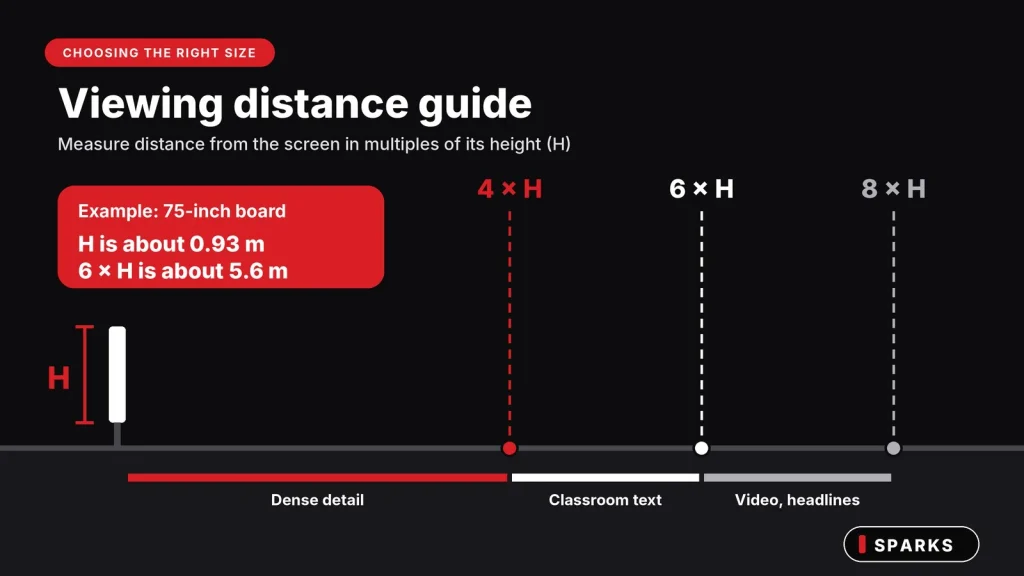
The audiovisual industry relies on the 4-6-8 Rule to establish the minimum display height required for audience comprehension. Here is how to apply it specifically to interactive environments.
What is the 4-6-8 Rule?
The rule defines the maximum viewing distance as a multiple of the display’s vertical image height (H), categorized by content density and viewer task:
| Viewing Tier | Maximum Distance | Content Type | Installation Examples |
|---|---|---|---|
| Analytical Viewing | 4 × Image Height | Critical inspection, dense data, small typography, engineering schematics | Multi-user touch tables, complex interactive timelines, data dashboards, museum digital archives |
| Basic Viewing | 6 × Image Height | Standard legibility, presentation slides, educational body text | Classroom interactive flat panels, guided tour screens, interactive wayfinding maps |
| Passive Viewing | 8 × Image Height | Ambient motion, high-contrast imagery, video playback, large headlines | Idle attract loops, digital art backdrops, waiting area queue displays |
Common Sizes and use cases
- 65 inches: small classrooms, coaching batches, and meeting rooms for up to about 10 to 12 people.
- 75 inches: the most common choice for a standard classroom.
- 86 inches: larger classrooms, seminar rooms and boardrooms.
- 98 inches and above: large halls and training rooms.
Room depth matters more than head count. A practical test is that the back row should be able to read normal text without straining. If you are between two sizes, go one size up: a board that is slightly too big is a small annoyance, while one that is too small is a daily one. At these sizes, 4K resolution (3840 × 2160) is the sensible baseline, because Full HD looks soft when viewed up close.
Technical specifications that actually matter
Touch technology
Panels use infrared or capacitive touch. Infrared is widespread and works with a finger, a pen or any object. Capacitive feels closer to a phone or tablet and is generally found on higher-priced models. What matters more than the label is how it feels in use: write quickly, draw a circle, and pinch to zoom with two fingers when you see a demonstration. Look for the number of touch points (20 is common), palm rejection, and pen and finger working together.
Display and glass
Choose 4K, anti-glare tempered glass, and wide viewing angles so that students sitting at the sides can read clearly. Brightness matters in rooms with large windows, so if your room gets strong daylight, check how the panel looks in a bright room before you decide.
Operating system: Android, Windows or both
An Android-only board starts quickly and is simple to use. It is enough for whiteboarding, video, web browsing and apps. An Android plus Windows board adds a full Windows computer in a slot at the back (the OPS module). Choose this if you need Windows software, specific meeting accounts, or a computer-lab style setup. Ask about the memory (RAM) and storage on the Android side, because a slow board is frustrating to teach on.
Connectivity
Check for an HDMI input, a USB-C port (on many models a single cable carries video and touch from a laptop), USB ports on the front for pen drives, a LAN port, Wi-Fi, Bluetooth, and wireless casting from Windows, Android and iOS devices.
Sound
Built-in speakers are fine for a small room. For larger rooms and halls, plan external speakers, an amplifier and a wireless microphone, because poor audio is often the weakest part of a smart room.
Software and subscriptions
Ask which whiteboard and annotation software is included, whether any app needs a yearly subscription, whether lessons can be saved as PDF or image files, and how software updates are delivered. Subscriptions are the most common surprise cost.
Weight and mounting
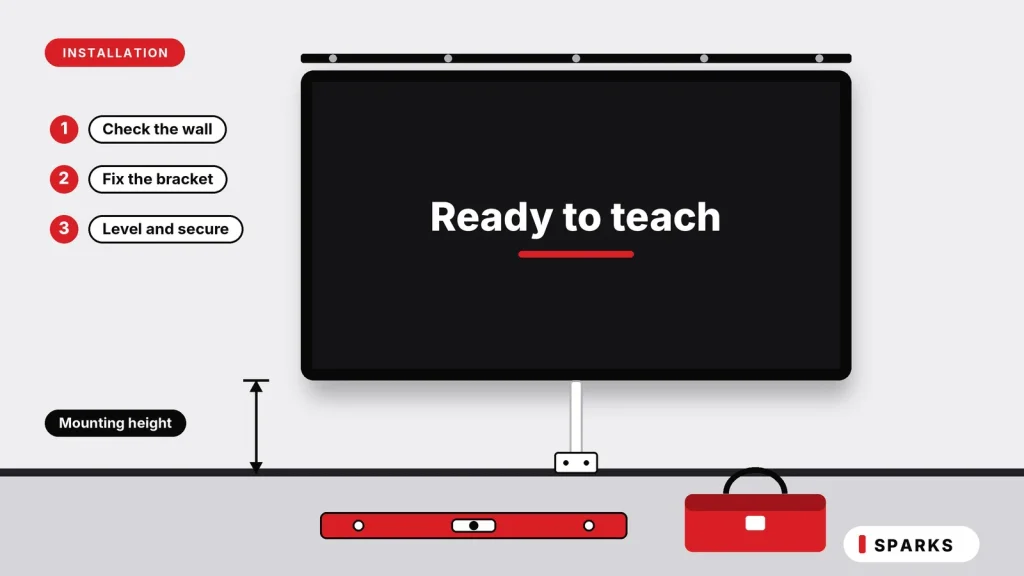
A 65-inch panel can weigh 50 kg or more, and larger sizes weigh more. Have the wall checked before installation, because a partition or hollow wall may need reinforcement. Decide between a fixed wall mount and a mobile stand if the board will move between rooms, and leave space behind it for ventilation and cables.
What decides the price of a Smart Digital Board
We deliberately do not print one price here. For the same screen size, prices in India run from entry-level to premium and can differ by more than double, so any single number would mislead you. These are the factors that decide where a board falls:
- Screen size: 65, 75, 86 and 98 inches step up in price.
- Brand and build quality: glass, frame, touch accuracy, motherboard and the brand’s service network.
- Operating system: Android only, or Android EDLA with a Windows module.
- Internal hardware: processor, memory and storage on the Android side
- Warranty: duration and what it covers.
Costs that are easy to miss:
- Wall mount or mobile stand
- Windows module, if it is not included
- Installation and cabling
- Camera, microphone and speakers, if the room needs them
- Whether GST is included in the quotation
- Delivery to your location
- Teacher or staff training
To compare quotations fairly, ask every supplier to quote the same size, the same operating system, and the same list of accessories.
Buying in Kashmir or Ladakh: what to plan for
Cold weather, heaters and condensation
Most panels list an operating temperature range that starts at around 0°C, so check the spec sheet for the model you choose. A board that has spent a night in a freezing store room, vehicle or unheated building can form condensation inside when it is brought into a warm room. Leave it in its packaging in a heated room for a few hours before switching it on for the first time. Keep it away from direct heat too: do not place it right beside a heater or bukhari, and never cover its ventilation slots.
Power quality and earthing
Voltage fluctuations and power cuts can affect many parts of the Valley, particularly in the colder months when demand is high. Ask your electrician to confirm that the socket has proper earthing, because poor earthing can cause touch problems and shorten the life of electronics. Use a surge-protected supply, and arrange some power backup if a sudden cut in the middle of a class or meeting would be a problem.
Delivery and handling
A large panel is heavy and fragile. Check the box for damage when it arrives, ideally in front of the delivery person, and keep the packaging until the board is installed and working. Report any problem immediately, before installation.
Local service and warranty
Warranty on these products is normally provided by the brand. Before buying, ask how long the warranty runs, whether service is available in Srinagar or the panel must be sent outside the Valley, who attends on-site faults, and what the usual turnaround is. Keep the invoice and the warranty card safe.
Checklist before you pay
- Is the size right for the depth of my room?
- Is the display true 4K, with anti-glare tempered glass?
- Does it use infrared or capacitive touch, and how many touch points?
- Is it Android only, or Android with a Windows module?
- Are RAM and storage stated for the Android side?
- Are the mount or stand, cables and installation included in the quote?
- Does any software need a yearly subscription?
- What is the warranty period, and who services it in Kashmir?
- Is GST included?
- Will my wall carry the weight, and is the socket properly earthed?
Beyond the board: building a complete smart room
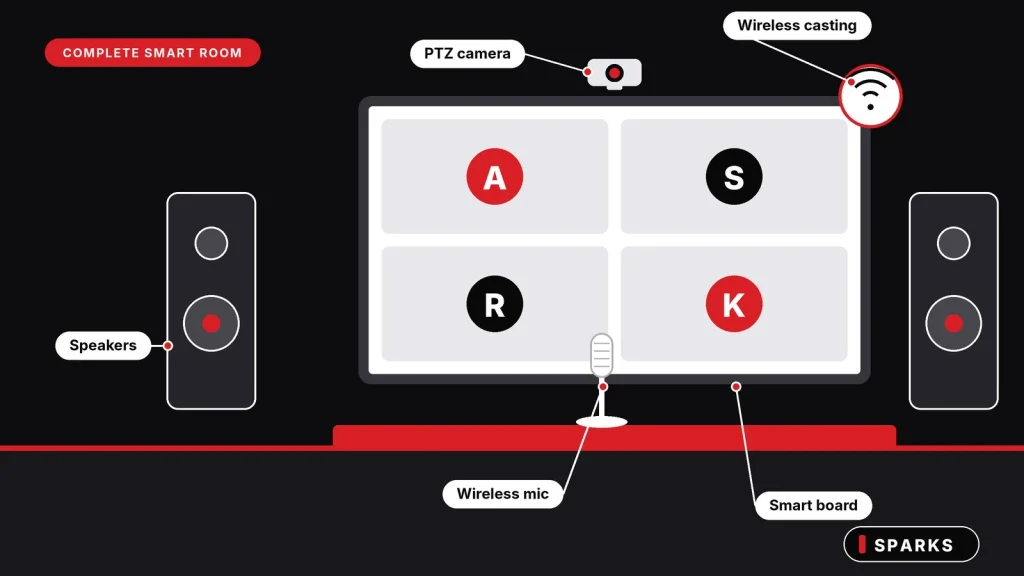
A board on its own is only part of a good smart room. Depending on how the room will be used, you may also need:
- A PTZ camera to record lessons, stream lectures or run hybrid meetings.
- Wireless microphones so that every voice is clear, from the teacher at the board to a speaker at the back of the hall.
- Speakers and an amplifier for larger rooms.
- Interactive kiosks for reception areas, campuses and exhibitions.
Planning these together costs less and works better than adding them one at a time later, because the cabling, mounting and compatibility are decided once.
Smart digital board and display brands available in Srinagar
Sparks supplies smart digital boards and AV displays in Srinagar from LG, Samsung, Teachmint, ViewSonic, BenQ and Epson. Each brand has its own strengths, so the right one depends on your room, your budget and the service you need in Kashmir.
- LG: commercial interactive displays for offices, boardrooms and classrooms.
- Samsung: interactive displays and digital flipchart-style boards for meeting rooms and classrooms.
- Teachmint: interactive panels built with schools and coaching centers in mind.
- ViewSonic: ViewBoard interactive displays for education and corporate rooms.
- BenQ: interactive boards for classrooms and meeting rooms.
- Epson: best known for projectors, a good option where a projector still suits the room better than a panel.
Models and stock change, so message us on WhatsApp with your room size, use and budget, and we will suggest the options that fit.
Smart digital boards from Sparks, Srinagar
Sparks is an audio visual integration company based in Srinagar. We supply smartboards (interactive panels), PTZ cameras, wireless microphones, interactive kiosks and related AV equipment for schools, colleges, offices, hotels, hospitals, government departments and homes. Because we look at the whole room rather than selling a single box, we can help you match the board size, specifications and accessories to the way the room will actually be used.
- Genuine brands: LG, Samsung, Teachmint, ViewSonic, BenQ and Epson, plus professional guidance from people who work with AV every day
- Competitive prices
- Service area: Jammu, Kashmir and Ladakh in Srinagar, Anantnag, Baramulla, Ladakh and across Kashmir
- Delivery across J&K, Ladakh and Punjab with same day delivery in major cities including Srinagar, Anantnag, Baramulla (delivery cost depends on the order)
How to get a quotation
Tell us four things: the type of organization (school, business, government department and so on), the city or area, the size of the room and the number of people, and what you plan to use the smart board for. You can do this in two ways:
- Message us on WhatsApp at 8899788118
- Fill in the request a quote form, which opens WhatsApp with your details ready to send
Frequently asked questions
What is a smart digital board?
It is a large 4K touchscreen with a computer built in that replaces the blackboard, whiteboard and projector. You write on it with a finger or pen, play videos, run apps and connect other devices to it. It is also called a smart board, digital board or interactive flat panel.
What is the best smart board for classroom teaching?
There is no single best model, because the best board is the one teachers use every day. For most standard classrooms, a 75-inch 4K board with smooth pen and finger writing, anti-glare glass and an Android system (with a Windows module if you need it) is a sound choice. Training for teachers and a proper installation matter as much as the board itself. Tell us your room size and class strength and we will suggest options.
Which size of smart digital board is best for a classroom?
A 75-inch board suits most standard classrooms. Choose 65 inches for small batches and 86 inches for larger rooms. Judge by the depth of the room: the back row should be able to read normal text comfortably.
Does a smart digital board work without internet?
Yes. Writing, the whiteboard, local files, USB drives and laptop connections over HDMI all work offline. You need internet only for cloud content, software updates, web browsing and video calls.
Is a smart digital board better than a projector?
For daily teaching, usually yes. It gives direct touch and writing, works in a bright room without shadows, and has no lamp to replace. A projector can still make sense when the budget is limited and the room can be darkened.
Can I connect my laptop or phone?
Yes. You can connect a laptop with an HDMI or USB-C cable, or cast wirelessly from Windows, Android and iOS devices. Check the supported casting methods for the model you choose.
Will a smart digital board work in Kashmir’s cold winters?
Yes, within the operating temperature range in its specification. The risk is not normal use in a heated room but switching on a board that is still freezing cold, which can cause condensation. Let it warm up in its packaging first.
How long does a smart digital board last?
Commercial LED panels are typically rated for tens of thousands of hours of use, so a board used a few hours a day can last for many years. Check the rated hours and the warranty in the specification of the model you buy.How long does a smart digital board last?
Which smart digital board brands do you supply?
Sparks supplies LG, Samsung, Teachmint, ViewSonic, BenQ and Epson. Models and stock change, so message us on WhatsApp with your room size and use, and we will suggest suitable options.
Do you deliver outside Srinagar?
Yes. Sparks delivers smart digital boards (also called interactive panels) across J&K, Ladakh and Punjab, and serves Srinagar, Anantnag, Baramulla and the rest of Kashmir. The delivery cost depends on the order.
Does Sparks provide GST bill with the purchase?
Yes, you get a proper GST bill with every purchase at sparks
Get the right Smart Board for your space
The best smart digital board in srinagar is the one that fits your room, your use and your budget, and is backed by a trusted reliable supplier like Sparks which is available when you need help. Send us your room details on WhatsApp or through the quote form, and we will help you choose.